
GPS Location Tracker Pro
RadoanHossanDevMaps & Navigation
3.5107.00 Reviews
- Version
- 2.6.0.0
- Installs
- 5.00M
- Age Rating
- Everyone
Screenshots
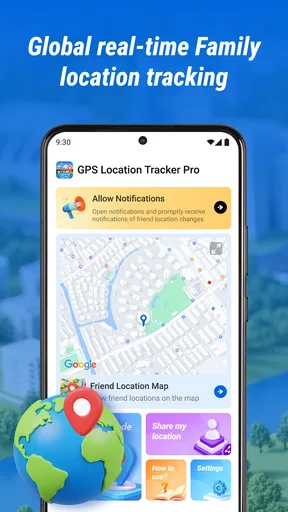
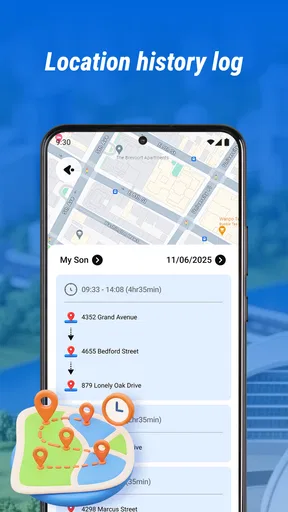
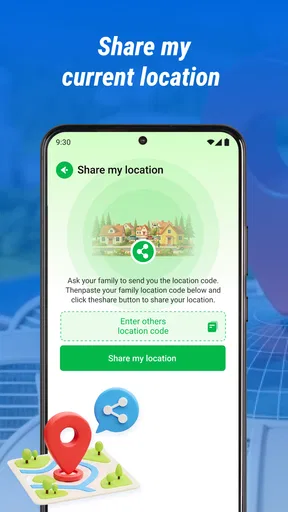
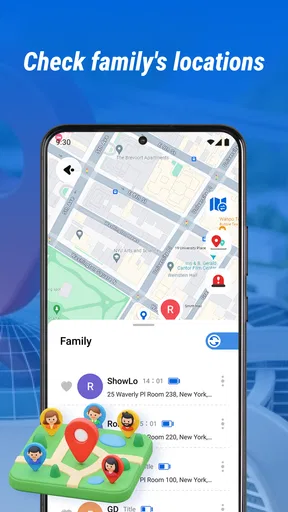
Our Review of GPS Location Tracker Pro
 Analysis by Appyee
I see GPS Location Tracker Pro as a practical choice for people who want a shared view of where their group is, rather than another navigation app focused on directions. Its appeal is easy to understand: a family member can check whether someone is on the way, and a friend can share a location during a meet-up. That convenience depends on everyone agreeing to share, though, and I would treat location access as a deliberate choice—not a background setting to forget about.
Where shared location is genuinely useful
The strongest use case is coordination when plans involve moving people. If I’m meeting a friend in a busy area, a shared location can save a string of “where are you?” messages. For a household, it can offer reassurance during a commute or help a parent check whether a child has arrived, provided the family has discussed when sharing is appropriate. It is less useful for a one-off destination search: a conventional maps app is usually better when I need turn-by-turn directions, traffic context, or help finding a place.
A useful habit is to agree on the purpose before sharing. For example, a group could use location sharing only while travelling to a concert, then turn it off once everyone arrives. That keeps the tool tied to a specific plan instead of making permanent visibility feel like the default. I would also make sure each person knows how to stop sharing, rather than assuming that one person’s settings should govern everyone else.
A realistic day with a location-sharing app
Picture a parent collecting a child after an activity while the parent is delayed in traffic. If both phones are set up for sharing, checking the map may answer whether the child has left the venue without interrupting them with repeated calls. The practical value is not that a map replaces a conversation; it is that it can make a brief check-in easier when people are busy. For safety-sensitive plans, I would still confirm arrangements directly and avoid relying on a location dot as proof that everything is fine.
For a friend group, the same approach works differently. One person can share their position while walking to a meeting point, so the others can choose where to wait. It is most helpful when the group has a clear meeting plan and everyone understands who can view the location. If plans change, a message is still better than expecting others to infer intent from movement on a map.
How it fits among the usual alternatives
Compared with sending a location pin in a messaging app, a tracker is more suited to seeing movement over time rather than sharing one fixed point. A pin can be enough when I only need to show where to meet; continuous sharing makes more sense when someone is travelling and the group needs to follow progress. The trade-off is that ongoing visibility asks for more trust and attention than a single message.
Compared with a dedicated navigation app, this kind of tool answers “where is this person?” rather than “how do I get there?” I would keep a maps app for routes and use location sharing for coordination, rather than expecting one to replace the other. And compared with calling or texting, the map can reduce interruptions, but it cannot explain a delay, confirm that someone is safe, or tell me why a person stopped moving. Those are good reasons to keep ordinary communication in the loop.
Small choices that make sharing more sensible
Before relying on any location-sharing setup, I would check whose phone is sharing and which people can see it. That simple review prevents the common mistake of assuming the intended contact is the only viewer. I would also agree on an end point for temporary sharing—arriving home, finishing a trip, or reaching a venue—so the group does not leave access active longer than needed.
Another useful practice is to treat a location display as an estimate, not a promise of exactness. A phone may not update at the moment someone expects, and a map marker does not explain what is happening around that person. If the situation matters, a quick call or message is the better confirmation. This distinction helps avoid turning a helpful convenience into a source of unnecessary worry.
Battery and connectivity are practical considerations for any app that uses location. I would check the phone’s battery before a long day out and avoid assuming that a tracker can keep reporting when a device is switched off or unable to connect. If someone needs dependable navigation on a trip, they should plan with a maps app and offline options where appropriate; location sharing is a companion for coordination, not a substitute for those preparations.
The app is a better fit for people who already have a trusted circle and a clear reason to share. It is a weaker fit for anyone who wants private, occasional navigation without involving other people, or who dislikes the idea of being visible on a map. It also may not suit a group that cannot agree on boundaries. The feature only feels reassuring when sharing is mutual, understood, and easy to stop.
Before installing, I would ask a few practical questions: Will the people I want to coordinate with use it too? Do we need a live view, or would a location pin do? When should sharing end? And what will we do if the location does not update? Thinking those through in advance is more useful than simply switching on every available option. It also makes it easier to decide whether a dedicated tracker is worth adding to a phone already full of maps and messaging tools.
For readers comparing options, the key distinction is the job they need done. A standard map is the sensible pick for directions, a chat app can handle a quick “meet me here,” and a shared-location app is most worthwhile when a trusted group needs to coordinate movement. I would not install a tracker just because it sounds reassuring; I would install one when the recurring inconvenience—missed meet-ups, uncertain arrivals, or repeated check-ins—is real enough to justify sharing.
Ever found yourself in a situation where you wished you could just magically track your friend who’s always late, or maybe even keep tabs on your own wandering tendencies? Well, that’s where GPS Location Tracker Pro comes into play. Let me walk you through my experience with this nifty app that promises to keep you connected with your loved ones and always aware of your location.
Getting Started with GPS Location Tracker Pro
Diving right into the app, the initial setup was pretty straightforward. After downloading it from the app store, I was greeted with a friendly interface that asked me to set up my profile. I was pleasantly surprised by how intuitive the whole process was. You simply plug in your basic info, and voila, you’re ready to go. The app even offers a quick tutorial for first-time users, which I found to be quite handy.
Main Features that Stand Out
Now, let’s chat about what makes GPS Location Tracker Pro tick. The app comes loaded with a bunch of features that are perfect for anyone who needs to keep track of their whereabouts or wants peace of mind knowing where their family is.
- Real-Time Location Sharing: This feature allows you to share your live location with selected contacts. It’s like having your own personal homing beacon. I tested this with a friend, and it worked flawlessly. They could see my movements almost instantly, which was both cool and slightly creepy (in a good way!).
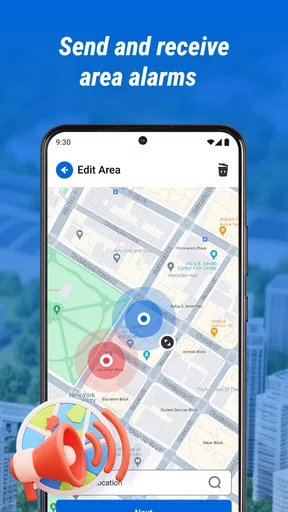
- Geo-Fencing: One of the more advanced features, geo-fencing lets you set up virtual boundaries. Whenever a phone crosses these boundaries, you get a notification. This is perfect for keeping an eye on the kids or making sure your partner doesn’t stray too far from home.
- Location History: Curious about where you’ve been all week? The app keeps a detailed history of your movements. It’s like having a diary without the need to write anything down. I found this particularly useful for tracking my jogging routes.
User Experience and Interface
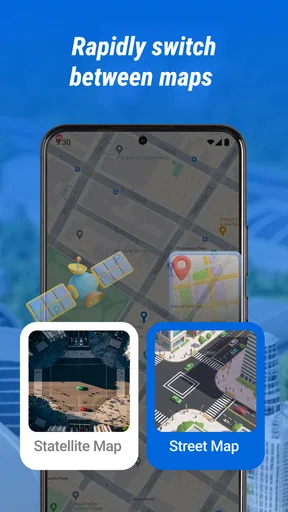
The user interface of GPS Location Tracker Pro is another highlight. It’s clean, modern, and easy to navigate, which is a huge plus for someone like me who doesn’t want to spend ages figuring out how things work. The map view is particularly well-designed, offering both satellite and standard map options.
One thing I really appreciated was how the app managed to pack so many features without feeling cluttered. Everything is neatly categorized, and the icons are self-explanatory. It’s clear that a lot of thought went into making the app user-friendly.
Privacy and Security
Alright, let’s talk about something on everyone’s mind: privacy. In today’s world, handing over your location data can feel a bit like giving away your diary. However, GPS Location Tracker Pro takes this seriously. The app promises end-to-end encryption, ensuring that your data is safe and sound. You also have full control over who can see your location and for how long, which is a relief.
I tested the privacy settings, and it was easy to toggle location sharing on and off. Plus, you can set it to only share your location during certain hours, which I found to be a sweet feature for those who value their privacy outside of work hours.
Battery Consumption
Now, the big question: does it drain your battery? Surprisingly, the app is quite efficient. I used it throughout the day, and while it obviously does use up some battery (as all GPS apps do), it was minimal compared to other similar apps I’ve tried. It’s optimized well enough to not be a constant concern, which is a huge win in my book.
Final Thoughts
All in all, GPS Location Tracker Pro is a robust app that does what it promises without any unnecessary frills. Whether you’re a worried parent, a forgetful wanderer, or just someone who loves to stay connected, this app has something to offer. The combination of a user-friendly interface, solid features, and attention to privacy makes it a standout choice in the market. So, if you’re in the market for a reliable location tracking app, give this one a shot. You might just find it’s the perfect travel companion!
A measured recommendation for everyday use
GPS Location Tracker Pro is a free maps and navigation app from RadoanHossanDev, with a 3.9 average from around 850 ratings and over 1 million installs. It is rated for everyone, and version 2.0.0.0 runs on Android 7.0 or later. Those details make it accessible to a broad range of Android users, but popularity alone does not tell me whether a tracking tool fits a particular household. The deciding factor is whether people genuinely want shared location and can agree on its boundaries.
My recommendation is to start with one modest, clear use rather than turning location sharing into a permanent expectation. A commuter might share during the trip home; friends might use it to find each other at a crowded event; a family might agree to check arrival points during a busy day. If that limited use saves time without creating pressure, the app has a sensible place in the routine. If it leads to constant monitoring or arguments about why someone’s marker moved, the convenience is no longer worth the cost.
There is also a difference between keeping track of your own routes and letting other people follow you. The location history described in the app can be useful for remembering a jog or reviewing where a trip went, while live sharing serves a social purpose. I would keep those purposes separate in my mind: personal route awareness does not automatically mean other people should have ongoing access. That distinction makes the app easier to use thoughtfully.
On the whole, I find the idea most compelling for small, trusted groups who need occasional coordination. The app’s strengths are its combination of live sharing, boundary alerts, and a record of movement, while its central limitation is inherent to the category: a location tool cannot replace direct communication or guarantee that a map view tells the whole story. Used with consent and sensible limits, it can make arrivals and meet-ups less stressful. If you mainly need directions or prefer not to share your whereabouts, a conventional maps app or a one-time location message is the better choice.
Verdict
Strengths of GPS Location Tracker Pro
- Highly accurate location tracking.
- User-friendly and intuitive interface.
- Real-time location updates.
- Low battery consumption.
- Customizable alerts and notifications.
Limitations of GPS Location Tracker Pro
- Requires stable internet connection.
- Privacy concerns with location data.
- Ads in the free version.
- Limited features without subscription.
- May drain battery on older devices.
Similar Picks in This Category
View All
Uber - Request a ride
Uber Technologies, Inc.4.7


inDrive. Rides with fair fares
® SUOL INNOVATIONS LTD4.8

Yandex Go: Taxi Food Delivery
Mikromobilnost LLC Belgrade4.8

Bolt: Request a Ride
Bolt Technology4.8

Rapido: Bike-Taxi, Auto & Cabs
Rapido Bike Taxi4.8
Frequently Asked Questions
What features does GPS Location Tracker Pro offer?
GPS Location Tracker Pro provides real-time location tracking, route history, and geofencing capabilities. It allows users to share their location with friends or family and set up alerts for when someone enters or leaves a predefined area. The app also offers a user-friendly interface for easy navigation.
Is GPS Location Tracker Pro compatible with both Android and iOS devices?
Yes, GPS Location Tracker Pro is available for both Android and iOS platforms. This ensures that users across different devices can access the app's functionalities. Make sure to download the latest version from the Google Play Store or the Apple App Store for optimal performance.
How does GPS Location Tracker Pro ensure user privacy?
GPS Location Tracker Pro takes user privacy seriously by implementing strict data protection protocols. Users can control who has access to their location data and can disable location sharing at any time. The app does not store personal data without user consent, ensuring that your information remains secure.
Does GPS Location Tracker Pro require an internet connection to function?
While GPS Location Tracker Pro primarily uses GPS for tracking, an internet connection is needed to update maps and share location data in real-time. Offline mode is available for route history, but for full functionality, a stable internet connection is recommended.
Is there a subscription fee for using GPS Location Tracker Pro?
GPS Location Tracker Pro offers a free version with basic features, but to access advanced functionalities like geofencing and ad-free experience, a subscription may be required. Users can choose from different plans based on their needs, ensuring flexibility and affordability.
